
A USB cable packaging box needs to do more than hold a cable. It should fit the product and any included accessories, make the contents easy to understand, and support the way the package will be displayed or shipped. A cable sold on its own may need a different layout from a set that includes a charger, adapter, or printed materials.
This guide walks through seven practical steps for planning paper packaging for USB cables and charger accessories. It covers product information, box structure, interior layout, printed content, visual design, and sample review. Whether you are exploring custom USB cable packaging for a single product or planning a charger packaging box for a set, use the sections below to organize the decisions before design approval.
Sommario
- Define the Product Set and Packaging Purpose
- Choose a USB Cable Packaging Box Structure
- Plan the Interior Layout and Accessory Placement
- Organize Product Information on the Package
- Match the Paper Box Design to Your Brand and Sales Channel
- Prepare for Sampling and Review the Sample
- Frequently Asked Questions
Define the Product Set and Packaging Purpose
Before choosing a box, list everything that will go inside it. The package might hold one USB cable, or it might contain a cable, charger, adapter, instructions, and other accessories. Record the quantity, shape, and dimensions of each item. These details help determine the space needed and whether the interior requires separate positions or support.
Next, define how the package will be used. Is it intended for retail display, shipment with an online order, or both? Retail packaging often needs to help customers identify the product quickly. For online orders, the product box may be placed inside a separate shipping carton, so it is useful to clarify which package is responsible for presentation and which is intended for transit.
Different uses can lead to different design priorities. A retail package may need to present the brand and product information clearly from the front. A multi-item set may need a layout that makes the included accessories easy to see and understand. A package used in several channels may need to balance product presentation with practical handling.
Prepare a simple product information sheet before starting the design discussion. It can include:
- Product name, model, and quantity;
- Cable length and the dimensions of the cable and connectors;
- Charger, adapter, or other accessories included in the set;
- Intended use, such as retail display, online shipment, or both;
- Information that should appear on the package;
- Existing artwork, brand guidelines, or reference images.
The information does not need to be complicated, but it should be as accurate as possible. Product dimensions and the accessory list are especially important because they affect both the box size and the interior arrangement. If a product has several variations, identify which version the packaging is being designed for. A box intended for one cable length or connector combination may not automatically suit another.
Choose a USB Cable Packaging Box Structure
Select the structure by considering three questions: How will the product sit inside the box? How will the customer remove it? How will the package be displayed or handled? Starting with these questions keeps the discussion focused on the product and its use rather than on a box style chosen too early.
A single cable and a multi-item accessory set may need different layouts. A package for one cable can focus on keeping the cable arranged and making the connector easy to locate. A set containing a cable and charger needs enough room for both items and a clear way to show what is included. The opening and closing arrangement should also suit how customers are expected to access the products.
If the package will be displayed in a store, discuss the display position as part of the design brief. Consider which panel faces the customer and what information should be easiest to spot. If a hanging feature or another display option is being considered, confirm that it suits the product and the intended retail setup before it is built into the design.
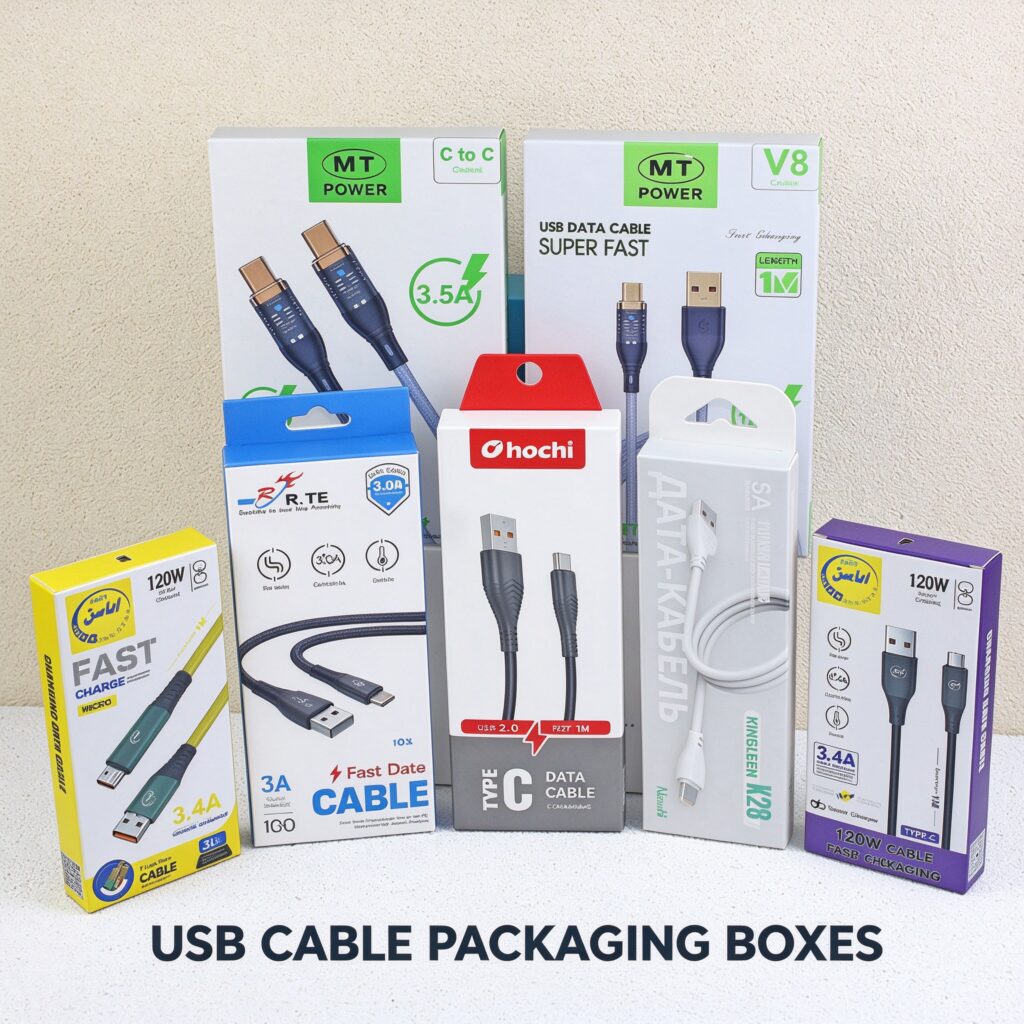
Do not assume that one structure or material works for every USB cable or charger. The best direction depends on product dimensions, set contents, design requirements, and available packaging options. The USB cable paper box product page is a reference for a related product. The site’s consumer electronics packaging page shows the broader application category. Specifications listed for an individual product example should not be treated as standard specifications for every custom order.
Plan the Interior Layout and Accessory Placement
USB cables can be coiled or arranged in different ways, while plugs, connectors, and chargers have their own shapes. The interior should be planned around the actual items, not an assumed standard size. Start by deciding where each product will sit, then consider whether dividers, paperboard supports, or another insert arrangement may be useful.
A simple placement sketch can make the layout easier to discuss. Mark the cable position, the direction of each connector, where the charger or adapter will go, and where any printed materials will sit. The sketch does not need to be a finished design. Its purpose is to show the intended arrangement so that the design and purchasing teams can review the same plan.
When reviewing the proposed layout, ask:
- Does every product and accessory have a defined place?
- Can the cable be arranged without forcing it into an awkward position?
- Are the connectors easy to find and remove?
- Can customers see what is included in the set after opening the box?
- Can the box close normally with all items inside?
- Does the insert or divider suit the product dimensions and package use?
The answers may differ for a cable sold by itself and a set with several components. A single item may need a straightforward arrangement. A kit may need clear separation so that the contents do not look crowded or confusing. If a charger and cable are next to each other, check whether customers can identify and remove one without disturbing the other.
Do not choose an insert material or structure before confirming the product and project requirements. Discuss whether a divider, paperboard support, or another approach should be evaluated, and then check the fit with a sample. If the product shifts, overlaps with another item, or is difficult to remove, identify exactly where the layout needs attention.
If the package will travel through a distribution network, the product-and-package combination may also need to be reviewed in relation to the expected shipping conditions. The International Safe Transit Association provides test procedures for evaluating packaging against transport hazards. These procedures are a reference for understanding possible evaluation approaches; whether testing is appropriate and which procedure applies should be determined according to the shipment and distribution conditions.
Organize Product Information on the Package
Before the artwork is laid out, prepare a list of the information the package should show. This may include the brand name, model, product description, compatibility information, or a list of included accessories. The brand owner should confirm which information applies to the product and the markets where it will be sold.
A simple information hierarchy can help organize the panel:
- Primary identification: the brand and the product name;
- Supporting product details: model, compatibility, or set contents;
- Other required information: content confirmed by the brand for the intended market.
Once the information is confirmed, decide which details should be most prominent. A package with several pieces of text can become difficult to read if every line is given equal emphasis. A clear hierarchy helps customers find the product name and key details without overlooking the rest of the information.
If a retail barcode will appear on the package, plan its location while arranging the artwork. Avoid placing it where folds, seams, edges, or other graphics may obstruct scanning. GS1’s General Specifications provide barcode placement guidance for trade items. Confirm the final barcode artwork, location, and size with the brand and relevant packaging teams for the specific package.
Match the Paper Box Design to Your Brand and Sales Channel
Color, typography, graphics, and surface finishes all contribute to how the package looks. Start with the existing brand guidelines and decide whether the package should continue the established visual identity or create a distinct look for a specific product line.
Review the artwork together with the box structure. A flat design file may not show how graphics will appear once the box is assembled. Check whether important text, logos, and images remain easy to see on the panels customers are likely to view. Also check that artwork does not fall across folds, seams, or opening areas in a way that interrupts the design or information.
Before approving the visual direction, consider:
- Is the brand name easy to locate?
- Can customers identify the product and included accessories?
- Does the information have a clear reading order?
- Will the main panel face the customer in the intended display position?
- Are the graphics positioned appropriately on the assembled package?
- Have the design files and product information been confirmed?
Paper and finish options should be discussed according to project requirements and the supplier’s available choices. Avoid treating a material or finish shown on one product page as a default for every order. If the brand plans to make environmental statements such as “recyclable” or “eco-friendly,” confirm the exact claim and its supporting basis before including it in the design.
Prepare for Sampling and Review the Sample
A useful sample review begins with a clear brief. Before requesting a sample, prepare the product and accessory dimensions, a complete list of what goes inside, the intended packaging use, and any available artwork or brand guidelines. It also helps to state what the sample is expected to confirm.
For example, the main purpose may be to check whether a cable and charger fit together, whether the contents are easy to remove, or whether the front panel presents the key information clearly. Naming these priorities helps the review stay focused.
When the sample is ready, check each point against the brief:
- Do the product and accessories fit as intended?
- Can the cable and connectors be arranged and removed easily?
- Is the interior layout clear?
- Does the package close normally with the products inside?
- Are the brand name and important product details easy to read?
- Is the barcode location clear and unobstructed, if one is included?
- Does the assembled package match the approved design direction?
- Are there any dimensions, layout details, or information positions that need adjustment?
When something needs revision, describe the item and location. For example, instead of saying “the inside does not fit well,” specify that the cable connector overlaps the charger or that an item is difficult to remove from its position. Clear feedback makes it easier to discuss the next revision.
The sample stage is also a good time to confirm that the final package suits its intended use. A sample can help review fit, access, information, and appearance, but it should not be treated as proof of performance under every distribution condition. If transport performance is a concern, discuss the expected shipping route and evaluation needs separately.
Frequently Asked Questions
What should I consider when choosing a USB cable packaging box?
Start with the product dimensions, accessory combination, and packaging purpose. Then review the box structure, interior layout, and information that should appear on the package. A single cable and a set containing a charger may need different arrangements, so use the actual product details when discussing the design.
Can one packaging box fit both USB cables and chargers?
It may be possible, but it depends on the dimensions, number, and arrangement of the products. A cable and charger set should be assessed as a complete group. The product category alone is not enough to decide whether one structure or layout will suit a particular set.
What information should I prepare before requesting custom USB cable packaging?
Prepare the dimensions of the cable and its connectors, the dimensions of the charger and other accessories, a list of everything that will go inside, and the intended packaging use. Artwork, brand guidelines, and a note about what you want to review in the sample can also help.
How should I plan the inside of a charger packaging box?
Begin by deciding where the charger, cable, and other accessories will sit. Consider whether the items are easy to see and remove, and whether a divider or other support should be evaluated. Confirm the arrangement against the actual product dimensions and review it with a sample.
What should I check when reviewing a paper box sample?
Check whether the products fit as intended, whether the cable and accessories are easy to arrange and remove, whether the box closes normally, and whether the package information is clear. Compare the assembled sample with the approved design direction and record any specific changes needed.
Should I test packaging for shipping?
That depends on the packaging use, transport conditions, and product requirements. If you want to learn about structured approaches to evaluating packaging during distribution, review ISTA’s test procedures and discuss the applicable approach with qualified packaging or logistics professionals.
Plan the Package Around the Product
A well-planned USB cable packaging box begins with accurate product information and a clear idea of how the package will be used. From there, the structure, interior layout, printed information, and visual design can be reviewed in a logical order. Preparing dimensions and an accessory list before the design discussion can help the team focus on the decisions that matter for the specific product.
If you are planning custom USB cable packaging or a charger packaging box, share the product dimensions, accessory list, and packaging goals with the team. You can review the USB cable paper box product page for reference, then use the website’s contact or quote request option to discuss your project.